
Communication breakdowns and stalled processes are still some of the biggest productivity killers in today’s workplace. Tasks slip through the cracks when teams are overloaded. Approvals that should take hours drag on for days. Critical information gets buried in inboxes or scattered across tools.
If this sounds familiar, your organization isn’t alone and it’s a sign that your workflows need an upgrade. Microsoft Power Automate streamlines communication and automates routine tasks. It keeps work moving even when your team is stretched thin.
Read on to explore how Power Automate can help your business reduce delays, eliminate manual bottlenecks, and create smarter, more connected processes.
What is Power Automate?
Power Automate is Microsoft’s cloud based automation platform that connects your apps, data, and services to streamline tasks and eliminate manual work. It enables organizations to automate repetitive processes, trigger workflows across systems, and create more efficient, consistent operations.
Most businesses run Power Automate in the cloud, but it also supports hybrid and on‑premises environments through connectors and gateways. It’s included in many Microsoft 365 plans and is also available as a standalone service for organizations that need more advanced automation capabilities.
Designed with a low‑code approach, Power Automate makes automation accessible to teams without deep technical expertise. Users can build workflows directly in the browser using a visual designer, and many simple automations can be created without IT involvement. This empowers teams to move faster, reduce bottlenecks, and improve productivity across the organization.
Actions and Triggers
At its core, Power Automate works by defining an action that happens when a trigger occurs. In simple terms: if X happens, Power Automate does Y. That may sound straightforward, but once you start chaining multiple triggers and actions together, you can build surprisingly powerful and sophisticated workflows.
For example, imagine your team regularly needs four people, Linda, Jack, Chandra, and Josie, to review and sign a form before it goes to finance. When the form is submitted (the trigger), Power Automate can immediately notify Linda to complete her part (the action). Once Linda signs, Jack is automatically notified, then Chandra, then Josie. When Josie finishes, the workflow can instantly route the completed form to the correct person in finance without anyone manually forwarding emails or tracking progress.
This kind of automation keeps work moving, reduces delays, and ensures nothing gets stuck in someone’s inbox again.
Templates and Connectors
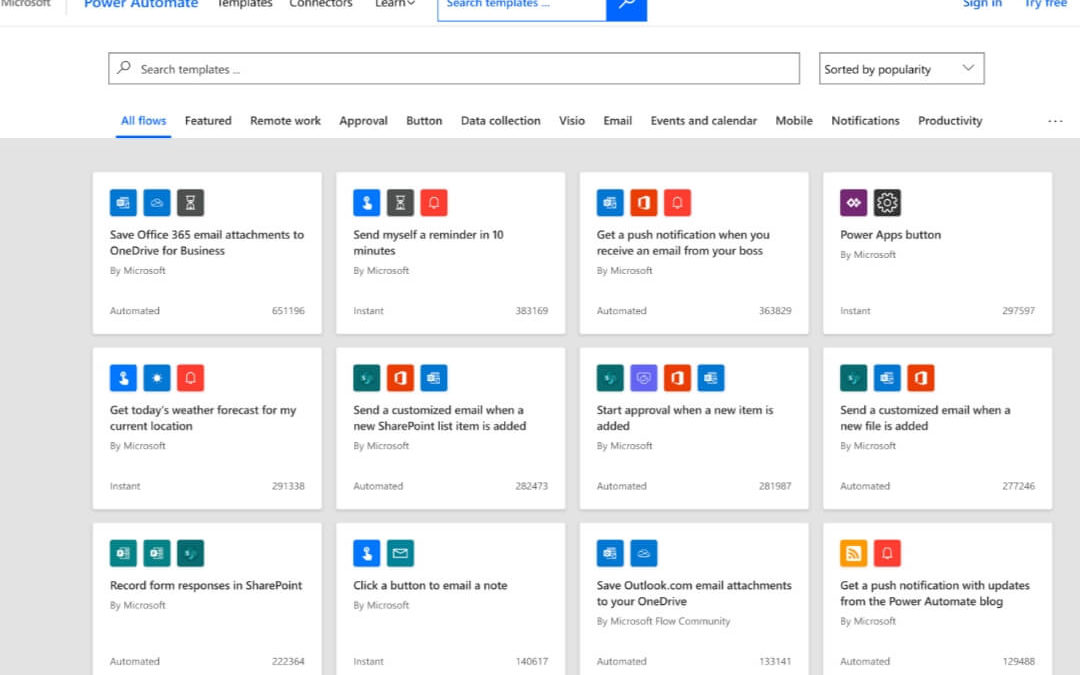
One of the reasons Power Automate is so accessible is its library of pre‑built templates and connectors. Think of them as ready‑made building blocks for your workflows. Instead of creating every automation from scratch, you can start with a template that handles common scenarios and customize it to fit your needs.
Templates cover everything from simple reminders and notifications to multi‑step approval processes and data synchronization across systems. You can automate alerts for new meetings, send scheduled updates, or pull weekly reports from tools like Salesforce or Dynamics 365.
Connectors make this possible by linking Power Automate to hundreds of apps and services; Microsoft 365, Salesforce, Mailchimp, Slack, social platforms, databases, and many more. With these connectors, your workflows can move data, trigger actions, and keep information flowing smoothly across your entire tech stack.
How to Use Power Automate
There are countless ways to use Power Automate to streamline work across your organization. A great starting point is to map out your existing processes and identify where people are performing repetitive tasks, manually moving information, or waiting on someone’s inbox for progress. Those bottlenecks are prime candidates for automation.
Power Automate can handle everything from simple reminders to complex, multi‑step workflows. It can automatically prompt content owners to update intranet pages or policy documents, keep customers informed with real‑time updates on their helpdesk tickets, and monitor social media activity across multiple channels to strengthen marketing and engagement efforts.
By automating these routine tasks, your team can focus on higher‑value work while Power Automate keeps everything running smoothly in the background.
Easy Integration
One of the biggest advantages of Power Automate is how seamlessly it fits into your existing technology stack. Its extensive library of connectors makes it simple to link the apps and services your organization already relies on. Microsoft continues to expand this library, giving you even more flexibility to integrate cloud, on‑premises, and third‑party systems without heavy development work.
Most businesses use a mix of tools, CRM platforms, email systems, databases, marketing apps, collaboration tools and Power Automate can connect to hundreds of them. This allows you to build automation workflows that span multiple platforms, reducing manual effort and eliminating repetitive tasks that slow your team down.
By automating routine work, your employees can shift their attention to higher‑value activities that drive growth, innovation, and stronger business outcomes.
Easy Access to Data
Data is one of the most valuable assets your business has. It reveals what’s working, where improvements are needed, what customers expect, and which efforts aren’t delivering results. But when information is scattered across departments, systems, or platforms, data silos form and those silos slow down decision‑making.
Power Automate breaks down data barriers across teams and systems. Its connectors and automation tools deliver the right information to the right people instantly. Workflows distribute new data as soon as it arrives, keeping teams aligned and removing delays from manual handoffs.
By making data more accessible and more timely, Power Automate empowers your organization to move faster and make smarter, more informed decisions.
Prioritize Tasks
Employees will still face moments when their workload becomes overwhelming, even with strong automation in place. Prioritization is essential, because manual task sorting often leads to delays and missed deadlines.
Power Automate helps you build prioritization directly into your workflows. You can automatically flag high‑priority items, route urgent requests to the right people, and send reminders for tasks that need immediate attention. Workflows push critical actions to the top and delay lower‑priority tasks until the essentials are finished.
By automating task prioritization, your team stays focused on what matters most, even when workloads spike.
Learn More About Power Automate
Power Automate is one of the most effective tools for improving efficiency across your organization.
Automation cuts delays, reduces manual work, and keeps teams supplied with the information they need. It also helps keep work on track during busy seasons, preventing important tasks from slipping through the cracks.
If you’re ready to explore how Power Automate can benefit your business, take a look at the additional resources available at IncWorx. We offer personalized Microsoft consulting and support to help teams collaborate, communicate, automate, and operate more effectively. Reach out today to start boosting productivity, expanding your capabilities, and transforming the way your organization works.